UltraWide Mode Overview
The XREAL One Series supports 「UltraWide Mode」with different aspect ratios, delivering a more immersive viewing experience for movies, gaming, short-form video, and multitasking.
「UltraWide Mode」 allows you to switch the screen aspect ratio to 「16:18」 / 「21:9」 / 「32:9」. But please note that not all devices or systems support video output in a true 32:9 signal format. As a result, some devices may not display a full ultra-wide effect even when 「UltraWide Mode」 is enabled.
Supported UltraWide Formats
「16:18」
Provides a taller vertical field of view, ideal for browsing vertical content, watching videos, short-form media, and multitasking scenarios.
「21:9」
Offers better device and game compatibility compared to「32:9」. Samsung phones can use this format directly in DeX mode without additional configuration.
「32:9」
An earlier supported UltraWide specification with higher requirements for device video signal output.
How to Enable UltraWide Mode
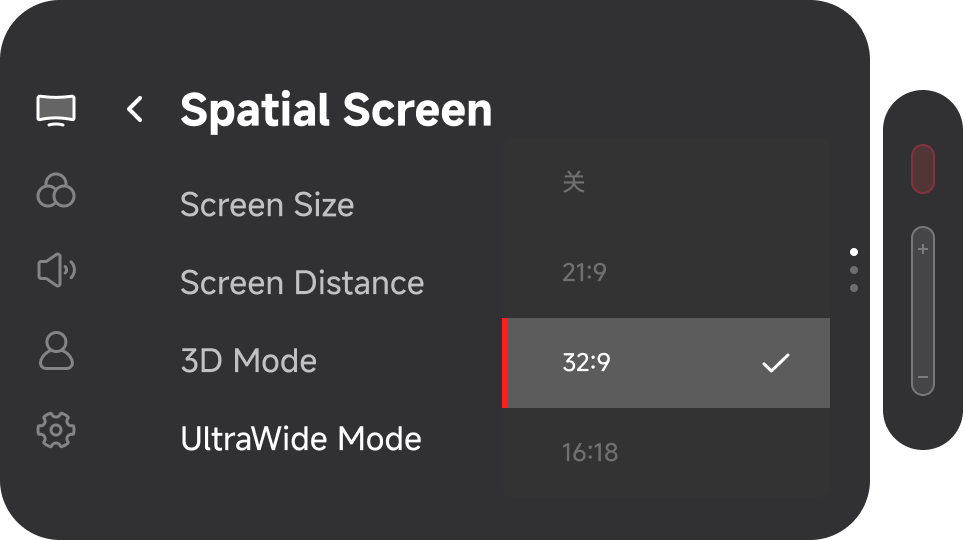
- Double click the 「X」Button to open the menu
- Under the 「Spatial Screen」, select 「UltraWide Mode」
- Choose the desired size to activate 「UltraWide Mode」
When using「UltraWide Mode」, set the glasses as an extended display on your computer. If the glasses are set to mirror your computer screen, the display will keep the same aspect ratio as the main screen, so the 「UltraWide Mode」 effect may not be visible.
Personalization Settings
Screen Size Adjustment
Allows you to customize the screen size within UltraWide Mode to match your viewing preferences.
Screen Distance Adjustment
Enables adjustment of the viewing distance. The minimum adjustable distance is 1 meter, allowing closer viewing for fine details.
Power-Off Memory
- Double-click the red 「X」button to enable the OSD menu and select 「Other」.
- On the 「Other」menu page, keep clicking 「-」button to turn to the last page, then you can find「Laboratory」.
- Click the red 「X」button to enter 「Laboratory」, then select 「21:9」/「32:9」 or 「16:18」 to enable the corresponding default ultra-wide mode.
- Once activated, the glasses will automatically enter 「UltraWide Mode」 each time they connect.
Common Devices That Support UltraWide Mode
- iPad
- Mac computers
- Windows PCs
- Windows handheld devices
- Steam Deck (refer to device-specific instructions for setup)
- Certain Android devices with desktop mode support
- Samsung DeX
- Huawei Desktop Mode
Common Devices That Do Not Support UltraWide Mode
- iPhone
- Standard mobile Android devices
- Nintendo Switch
- Xbox
- PlayStation
- If the connected device does not support video output in the selected aspect ratio, enabling 「Ultra-Wide Mode」 may not produce an actual ultra-wide display effect.
- When using XREAL 1S, the display resolution remains 1080p when 3D Mode is enabled in Ultra-Wide Mode.