IPD Adjustment
If the screen appears incomplete, double vision or the edges look unclear while wearing the glasses, try adjusting the IPD.
XREAL One Series glasses support IPD adjustment in the function menu. There are 13 levels in total for「IPD Adjustment」,the default setting is Level 7 (center IPD). Each step up or down adjusts the IPD by 1 mm based on the center IPD of the current model. Before using the IPD adjustment feature, make sure your IPD falls within the supported range for your glasses:
- XREAL One / XREAL 1S: 59.5 mm–70.5 mm (center IPD:64mm)
- XREAL One Pro (M): 57 mm–66 mm (center IPD:63mm)
- XREAL One Pro (L): 66 mm–75 mm (center IPD:69mm)
Notes
Adjusting the IPD may slightly reduce the maximum screen size and the farthest screen distance.
How to adjust IPD
- Double-click the 「X」button to enter the OSD menu
- Enter 「Spatial Screen」
- Keep clicking 「-」button to navigate to the last function and select 「IPD Adjustment」
- Use the 「+ / -」buttons to make fine adjustments
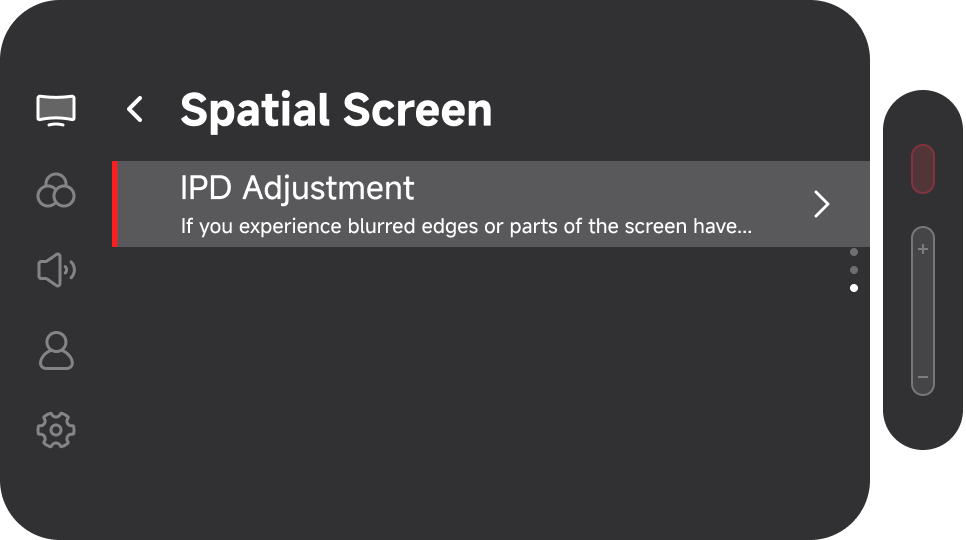 | 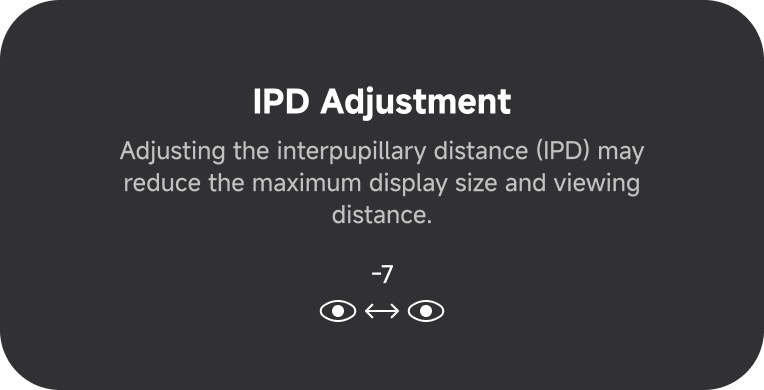 |
|---|---|
| IPD Setting OSD | IPD Setting Page |
- After entering 「IPD Adjustment」, the screen will automatically expand to fill the display. Because the visual result may vary with different IPD. Use the 「+ / -」 buttons to adjust the IPD until the image appears more complete and clearer.