REAL 3D Overview
「REAL 3D」 is a feature of XREAL One Series glasses that converts any 2D content into real-time 3D stereoscopic visuals.
No dedicated 3D video resources are required. Whether you are watching videos, viewing photos, browsing short-form content, or playing games, the glasses can transform regular 2D content into an immersive 3D experience with enhanced depth perception.「REAL 3D」currently supports XREAL One Series Glasses. Please ensure your device firmware is updated to the latest version: https://www.xreal.com/ota
How to Enable
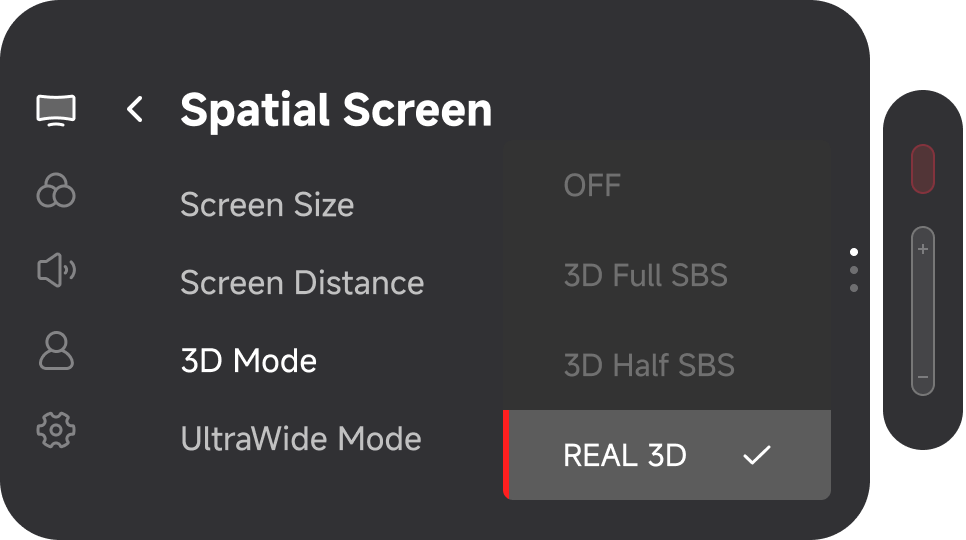
- Double-click the red「X」button to open the menu
- Navigate to 「Spatial Screen」 → 「3D Mode」
- Select 「REAL 3D」 to activate the feature
3D Effect Adjustment
After activating 「REAL 3D」, you can adjust the intensity of the 3D effect to achieve a more comfortable or more dramatic viewing experience.
- Double-click the red「X」button to enter the menu
- Go to 「Spatial Screen」and select the desired mode for「3D Effect」
Four Available Effects
| 3D Effects | Description |
|---|---|
| Soft | The most comfortable option, ideal for long movie sessions or casual gaming with minimal eye strain. |
| Natural | A balanced and commonly used option, suitable for short videos, movies, live streams, and photo browsing. |
| Enhanced | Stronger depth and pop-out effects for a more immersive experience. May introduce slight distortion or visual vibration. |
| Furious | The most intense depth level, recommended only for short demonstrations or experimental use. |
「Quick Button」 Setup for 「REAL 3D」
For faster access, you can assign a 「Quick Button」 to toggle 「3D Mode」 on or off.
- Double-click the red「X」button to enter the menu
- Navigate to 「My」 → 「Quick Button」
- Assign「3D Mode」to 「Click」/ 「Long Press」/ 「Double Click」
- Double-click the red「X」button to exit the menu, and now you can use the 「Quick Button」 to toggle 「3D Mode」 on or off.
- 「REAL 3D」 performs best with visual content such as movies, photos, short videos, and games
- Not recommended for office work, reading text documents, or precision tasks
- Higher 3D intensity levels may increase power consumption, heat generation, or occasional frame drops