Sound Settings
Adjust the volume level and select the appropriate audio output protocol to gain the best audio experience across different devices.
Volume Adjustment
Click the 「+ / -」 buttons to enter the 「Quick Panel」 ,then use the 「X」 button to select the volume icon, and adjust the volume level by clicking/long pressing the 「+ / -」 buttons. Please upgrade the glasses firmware to the latest version to gain the 「Quick Panel」 feature.
Audio Protocol
The 「Audio Protocol」 allows you to select the audio output mode. When connected to a device, audio is typically transmitted through either 「UAC」 or 「DP」 protocol.
UAC Protocol:Compatible with most devices that support USB-C DP output and usually enabled by default. You can adjust the device’s output volume directly from the glasses.
DP Protocol
HDMI-output or some gaming devices require switching to DP mode to enable direct volume adjustment on the glasses. Devices that commonly require DP mode include: Nintendo Switch、 Switch2、PlayStation 4、PlayStation 5、Xbox.
How to Switch Audio Protocol:
- Double-click the「X」button to open the OSD menu, then enter「Sound」
- Select 「Audio Protocol」
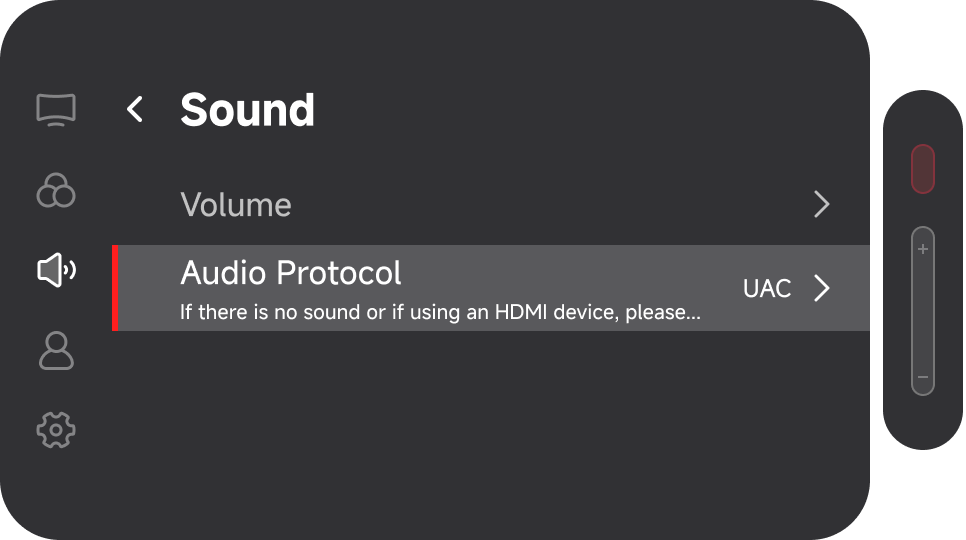
- Choose the desired mode
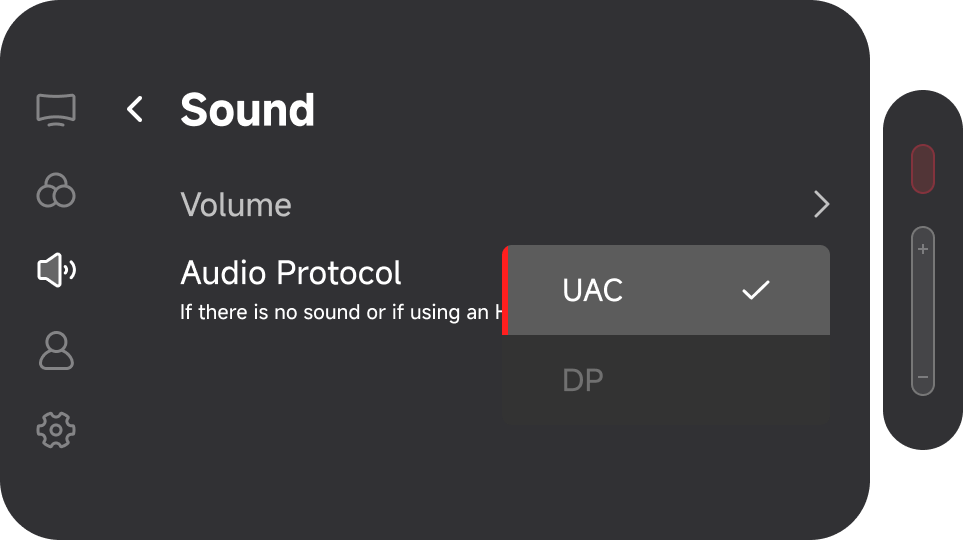
- If there is no sound after connecting a device, try switching the audio protocol
- In 「DP」mode, the glasses cannot synchronize volume control with the connected device
- It is recommended to use the default protocol unless compatibility issues occur