Quick Guide
This guide provides a quick overview of the XREAL One Series glasses' features and functions.
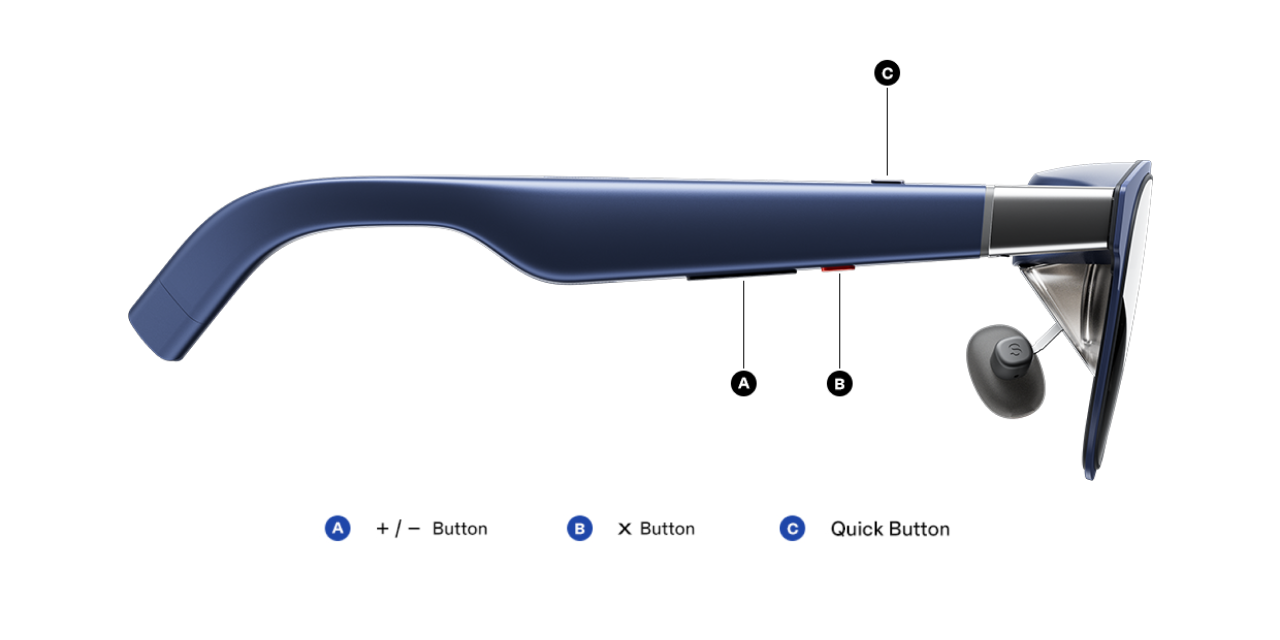
Get familiar with all the buttons first
Switching Display Modes
-
Click the 「X」 button to switch display modes.
-
Two default modes are available:
- 「Follow」mode: The screen moves smoothly with your head movement.
- 「Anchor」mode: The screen remains fixed in a stable position in space.
When moving your head in either mode, slight motion blur or trailing effects may occur due to natural visual persistence. Reducing brightness may help minimize this effect.
Recenter the Screen
- In 「Follow」mode, long-press the 「X」button to recenter the screen in front of your eyes.
Volume/Brightness/Electrochromic Dimming Adjustment
- Click「+/-」button to enable the 「Quick Panel」and click 「X」button to navigate between 「Brightness」, 「Volume」, and 「Electrochromic Dimming」
- Click or long-press the 「+/-」button to adjust the level of desired function.
To use this feature, please update your glasses firmware to the latest version.
Quick Button
- The 「Quick Button」supports customization.
👉 Click to view customization instructions.
OSD Menu
- Double-click the「X」button to open the OSD menu.
- You can adjust display, audio, shortcut settings, and more.
👉 Click to view detailed menu settings.
Menu Navigation
Inside the function menu:
- Click 「X」: Confirm selection
- Click 「+ / -」: Navigate up or down
- Double click「X」: Open the OSD menu/Return to the previous level
Language Setting
After the first successful connection, you will be prompted to select your preferred display language.
The language can be changed anytime in the 「Other」menu.
👉 Click to view language settings.
Firmware Update
- Check out the current firmware version in the「Other」menu.
- Keep your glasses' firmware up to date to gain access to the latest features and improvements. Update the firmware through the OTA website: https://www.xreal.com/ota/
If you notice slight motion blur or trailing effects, it is due to natural visual persistence. Reducing brightness may help minimize this effect.
SN Number Query
Using the XREAL Link App
You can download and install the 「XREAL Link」 app on an Android phone, then connect the glasses to view the device SN.
Download and Use
- Copy the following link and open it in your browser: https://s.xreal.cn/04dBqsua
- Download and install the 「XREAL Link」 app on your Android phone.
- Open the 「XREAL Link」 app.
- Connect the glasses to your phone and allow USB permission. You can then view the device SN.
Phone System Requirements
- Android 10 or later
Supported Glasses
- xbx AR glasses
- XREAL One Series AR glasses
This tool currently is mainly used to look up the device SN for scenarios such as the national subsidy program in Mainland China. If the glasses cannot be recognized properly, unplug and reconnect them, then try again.
You can also use a computer, either Windows or macOS, to visit the following website and follow the on-screen instructions to look up the SN: https://www.xreal.com/ota/?lang=en