Auto Shutdown Overview
The 「Auto Shutdown」is designed to automatically turn off the screen display after a long period of inactivity, reducing power consumption on the connected device.
The 「Auto Shutdown」 timer allows the glasses to automatically disconnect from the device when they are not worn for longer than the set time. Enabling this feature helps save power on the connected device. To ensure proper operation, it is recommended to update the glasses to the latest firmware version before use.
Operating States
During normal use, XREAL One Series glasses operate in three main states:
-
Active State
Both display and audio output function normally. -
Screen Off State (After 2 Minutes of Inactivity)
If the built-in gyroscope detects that the glasses remain stationary for approximately 2 minutes, the screen will automatically turn off. In this state, only the display is turned off while audio continues to function normally. -
Auto Shutdown State
If the glasses remain stationary for the duration set in 「Auto Shutdown」, the device will enter shutdown mode. In this state, all system modules except the gyroscope will pause operation. When the glasses are worn again, the system will automatically restore both display and audio output.
Change the 「Auto Shutdown」 Timer
- Double-click the「X」button to open the OSD menu
- Go to 「Others」
- Select 「Auto Shutdown」and choose the desired time
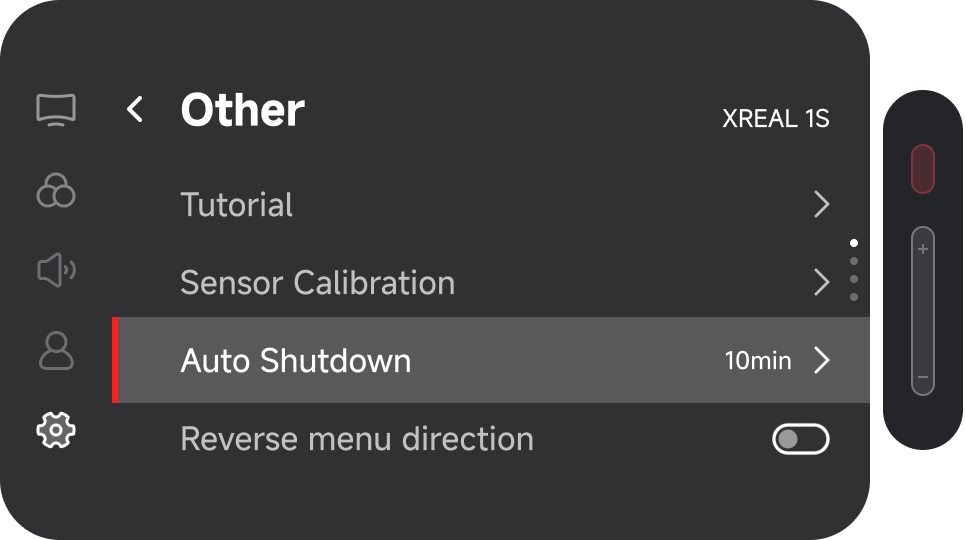
Available Time Options
Auto Shutdown supports the following settings:
- 30 seconds
- 5 minutes
- 10 minutes
- 20 minutes
- 1 hour
- Never
You may select the most appropriate option based on your usage habits.