Button Functions
Be familiar with button functions to enhance your viewing experience.
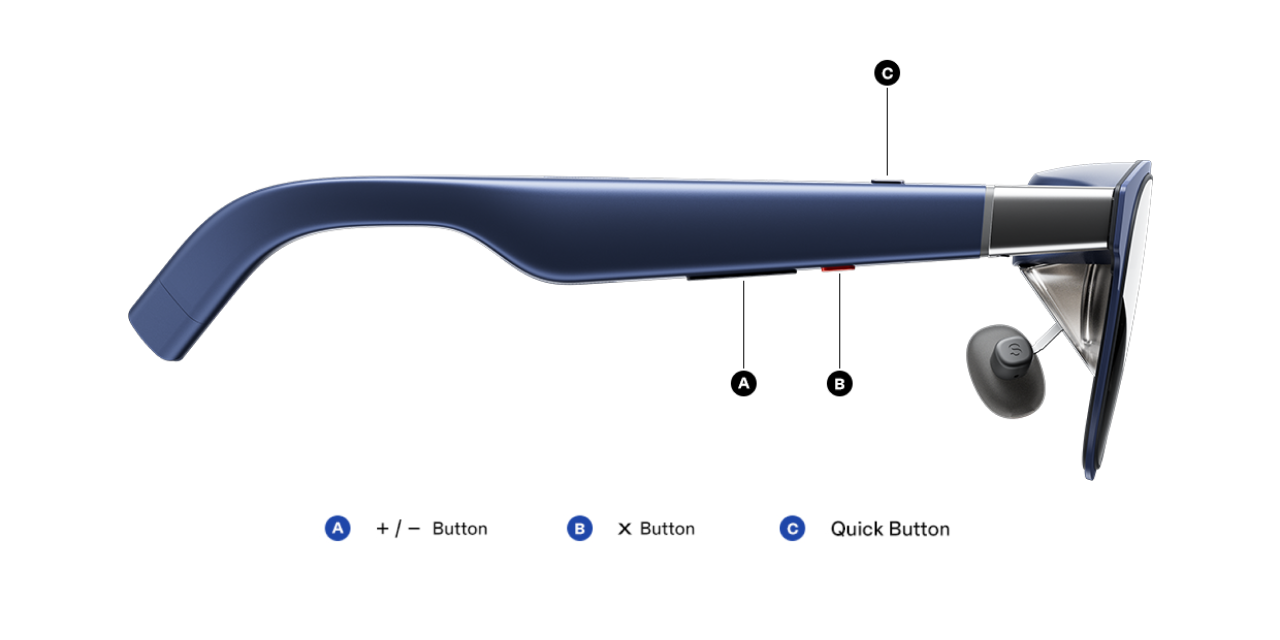
X Button
- Click: Switch display modes(「Follow」/「Anchor」modes)
- Double Click: Enable / Disable the OSD menu
- Long Press: Recenter screen position (「Follow」and 「Anchor」modes ONLY)
+/- Button
- Click:
- Enable the 「Quick Panel」
- Adjust 「Brightness」, 「Volume」, and 「Electrochromic Dimming」levels
- Navigate the OSD menu.
- Long Press: Adjust the level of desired function.
To use this feature, please update the glasses firmware to the latest version. https://www.xreal.com/ota/
Quick Button
When XREAL Eye is not connected:
- Click: Need to be Customized. Default: 「UltraWide Mode」with ratio「32:9」
- Long Press: Need to be Customized. Default: No function
- Double Click: Need to be Customized. Default: No function
When XREAL Eye is connected:
- Click: Take Photos
- Long Press: Record
- Double Click: Need to be Customized. Default: No function