Storage & Carrying
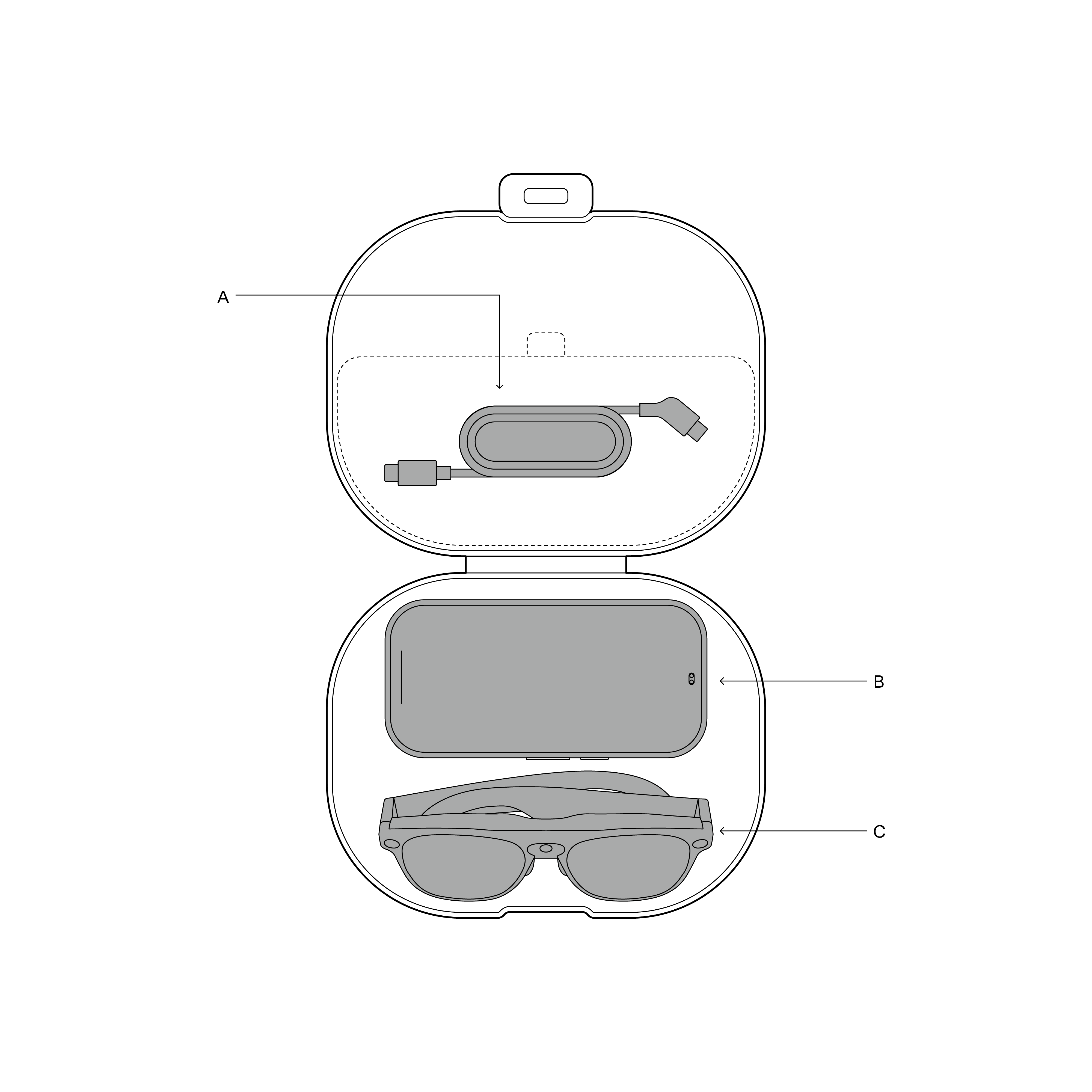
- A — Upper Lid Storage Area: Dedicated mesh divider compartment for storing the coiled glasses cable.
- B — Upper Puck Cavity: Custom-molded slot to securely seat the Compute Puck (touchpad facing up, with belt clip or lanyard attached).
- C — Lower Glasses Cavity: Protective recess for the folded XREAL AURA glasses (lenses facing up).
Use the Carrying Case
After each use, place your device in the included carrying case.
Case Specifications
The included hardshell carrying case features:
- Material: Tough hardshell exterior with a soft microfiber interior lining
- Protection: Impact-resistant design
Place the Glasses Correctly
- Fold both temples inward.
- Place in the case with lenses facing up.
- Position securely in the designated glasses slot.
The glasses should sit securely without moving.
Warning: Always place lenses facing up. Placing lenses down will cause scratches.
Coil the Glasses Cable Correctly
The glasses cable is a precision high-bandwidth component. Hold the cable loosely in your hand, coil it into a circle (approximately 10–15cm in diameter) without twisting or sharp bends, and place it into the storage area inside the upper lid of the carrying case.
Place the Compute Puck
- Place the Compute Puck in the designated area of the carrying case.
- Ensure the touchpad faces up, and check that the power button is not being pressed or squeezed.
- Keep the belt clip or lanyard attached if desired; it can be stored together.
The Compute Puck should sit securely without touching or pressing against the glasses.
Short-Term Storage (Hours to Days)
- Power off or put the device into sleep mode.
- Place in the carrying case.
- Store in a dry, cool location out of direct sunlight.
Guidelines:
- Several hours: Can remain in sleep mode.
- Overnight: Sleep mode or power off both work.
- Several days: Recommend powering off completely.
Long-Term Storage (Weeks or More)
- Charge the battery to 40–60% to protect battery health.
- Power off completely.
- Clean the lenses (see Cleaning Guide).
- Place in the carrying case.
- Store in a suitable environment.
Storage Environment
Store the device under the following environmental conditions:
- Temperature: -20°C to 45°C
- Humidity: Low to moderate, with no condensation
- Light: Protected from direct sunlight
- Location: Placed on a dry, clean, and stable surface
Periodic Checks
When storing for more than 2–3 months:
- Remove the device and check for signs of damage.
- Verify battery level; if below 20%, charge it back to 40–60%.
- Return to storage inside the case.
Related: Cleaning & Care | Travel Tips | Frequently Asked Questions (FAQ)