Hardware and Indicators
Hardware Layout and Indicators
Physical Design and Keys
- Ergonomic Curved Layout — Features an unfolded curved key arrangement with a standard ANSI / US English layout, delivering a natural, comfortable typing posture and effortless touch-typing orientation.
- High-Contrast Laser-Etched Keycaps — Durable, high-contrast legends that remain sharp and legible across all lighting conditions.
- Dedicated Meta Key — Located on the bottom row, allowing you to instantly open the XREAL AURA app launcher and summon the global shortcut menu with a single press.
- USB-C Charging Port — Located along the edge, dedicated exclusively to charging the internal battery. (Note: This keyboard connects wirelessly via Bluetooth only; the USB-C port does not support wired data transmission.)
- Precision Folding Hinge — Smooth bi-directional hinge that firmly locks into place when unfolded and folds down compactly for effortless everyday carry.
LED Indicator Status
Three dedicated LED indicators are positioned along the top edge of the keyboard to indicate power levels, connection status, and Caps Lock:
- Power Indicator (Power)
- Power On — Glows solid white for 3 seconds when unfolded, then turns off automatically.
- Charging (In Progress) — Glows solid red.
- Fully Charged (100%) — Glows solid green.
- Low Battery — Slowly flashes red (1 second on, 2 seconds off), reminding you to connect to power.
- Auto Power-Off — When the battery is fully depleted, the red indicator briefly flashes and the keyboard shuts down automatically.
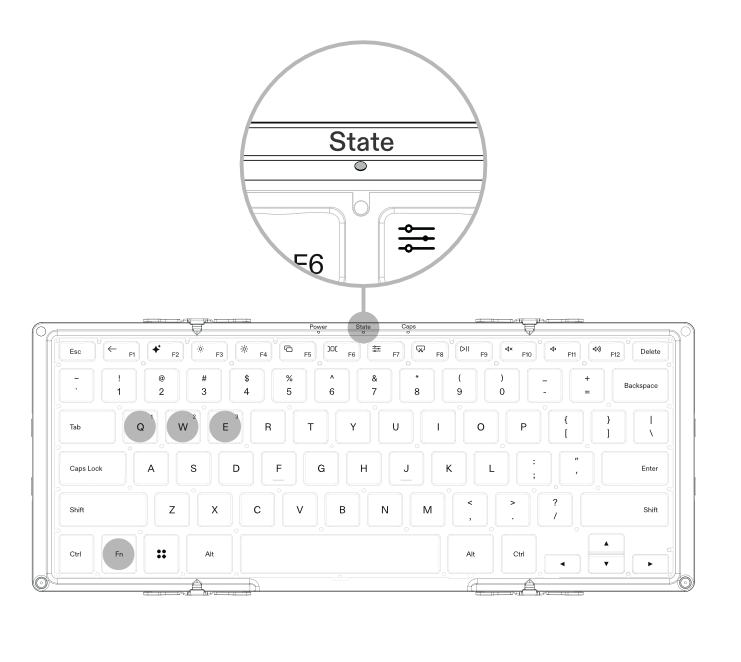
- Status Indicator (State)
- Bluetooth Pairing — Rapidly blinks blue (at 1 Hz) while waiting to pair.
- Channel Switched — Glows solid blue for 1 second, then turns off when pressing
Fn + Q / W / Eto switch channels. - Function Key Mode Switched — Glows solid blue for 1 second when pressing
Fn + Escto toggle between standard F-keys and media/spatial shortcuts.
- Caps Lock Indicator (Caps)
- Caps Lock On — Glows solid white.
- Caps Lock Off (Lowercase) — Indicator turns off.